Text Behind Image
Add text behind images instantly. Free & AI-Powered.
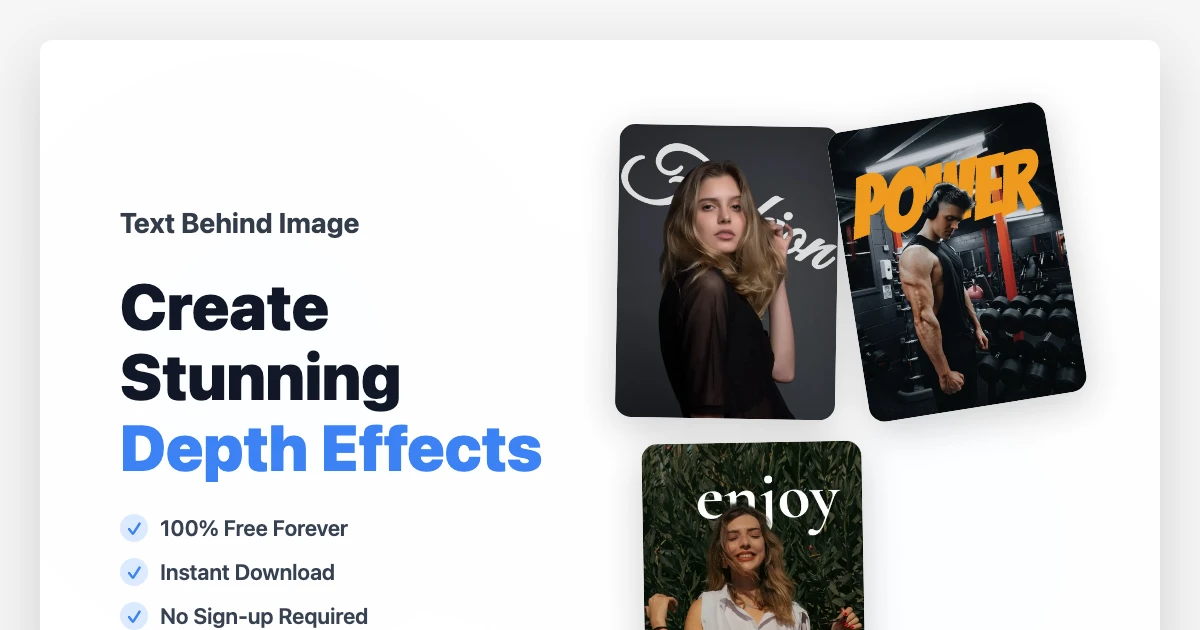
Text Behind Image is an AI-powered online design tool that allows anyone to effortlessly place typography behind subjects in their photos. By automatically detecting the foreground and processing background removal in seconds, it creates a professional-looking layered effect that previously required complex software like Photoshop. It's the perfect solution for creators who want to add depth and a "premium" feel to their visuals without any design skills.
Features
- Instant AI Background Magic: Automatically separates subjects from backgrounds with high precision using advanced machine learning.
- Real-time Layered Preview: See your text move behind people, objects, or animals instantly as you drag and edit.
- Professional Typography Suite: Access a curated collection of modern fonts with full control over spacing, color, and positioning.
- Non-Destructive Background Removal: High-quality edge detection that preserves fine details like hair and complex outlines.
- One-Click High-Res Export: Download your creations in crisp, ready-to-use formats for social media or professional print.
- Browser-Based & No Login Required: Start creating immediately without downloading software or registering an account.
Use Cases
- Stunning Social Media Visuals: Level up your Instagram Stories, Pinterest pins, and TikTok covers with cinematic depth effects.
- High-Conversion YouTube Thumbnails: Make your video titles pop by placing them behind the subject for a 3D professional look.
- Impactful Ad & Marketing Banners: Create eye-catching digital advertisements and hero images that grab attention instantly.
- Personalized Event Graphics: Design unique posters, flyers, and digital invitations with artistic layered typography.
- E-commerce Product Showcases: Enhance product photos by placing brand names or features behind the items for a high-end editorial feel.
- Creative Web Design Resources: Quickly generate unique banners and section backgrounds for blogs and landing pages.

Comments


Hi everyone! I built Text Behind Image because I was tired of spending 20 minutes in Photoshop just to get a simple layered text effect. I wanted to create something "invisible"—no accounts, no complex menus, and no learning curve. Just a tool that helps you turn a flat photo into a professional design in seconds so you can get back to your creative work. It’s completely free and built for speed. If this saves you a bit of frustration or helps you make something you're proud of, then I’ve done my job. I’d love to hear your thoughts and keep making this better for you!


I really like the idea of placing text behind images instead of layering everything on top. It creates a much cleaner and more modern visual style, especially for landing pages and social visuals. I’m curious — do you plan to add presets optimized for different use cases (e.g. hero sections, posters, social media sizes), or is the goal to keep it flexible and minimal?
Premium Products







Sponsors
Buy

Makers
Makers
Comments
Hi everyone! I built Text Behind Image because I was tired of spending 20 minutes in Photoshop just to get a simple layered text effect. I wanted to create something "invisible"—no accounts, no complex menus, and no learning curve. Just a tool that helps you turn a flat photo into a professional design in seconds so you can get back to your creative work. It’s completely free and built for speed. If this saves you a bit of frustration or helps you make something you're proud of, then I’ve done my job. I’d love to hear your thoughts and keep making this better for you!
I really like the idea of placing text behind images instead of layering everything on top. It creates a much cleaner and more modern visual style, especially for landing pages and social visuals. I’m curious — do you plan to add presets optimized for different use cases (e.g. hero sections, posters, social media sizes), or is the goal to keep it flexible and minimal?
Premium Products
New to Fazier?

Find your next favorite product or submit your own. Made by @FalakDigital.
Copyright ©2025. All Rights Reserved