
Redact
Private PDF redaction, processed locally in your browser
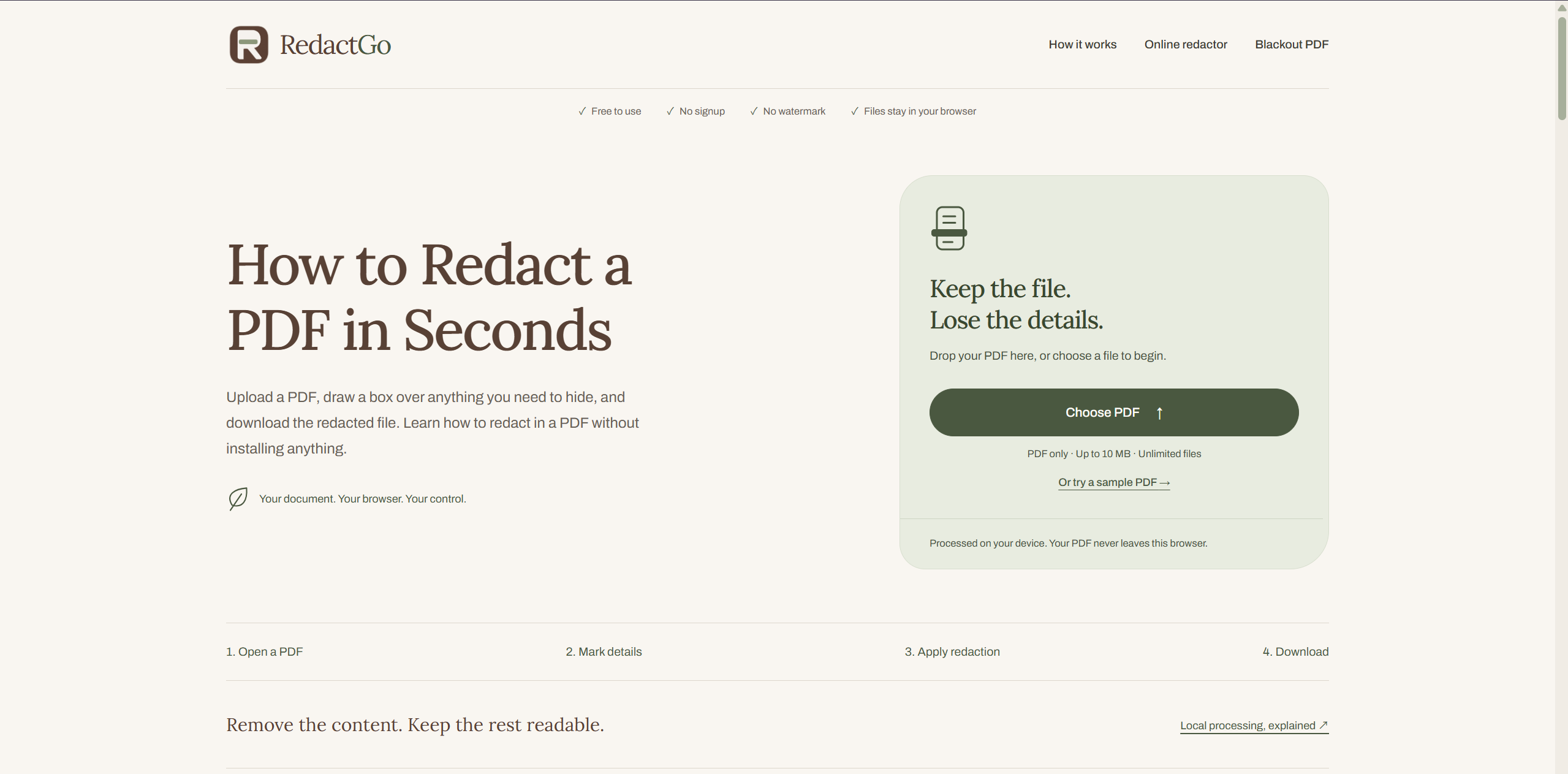
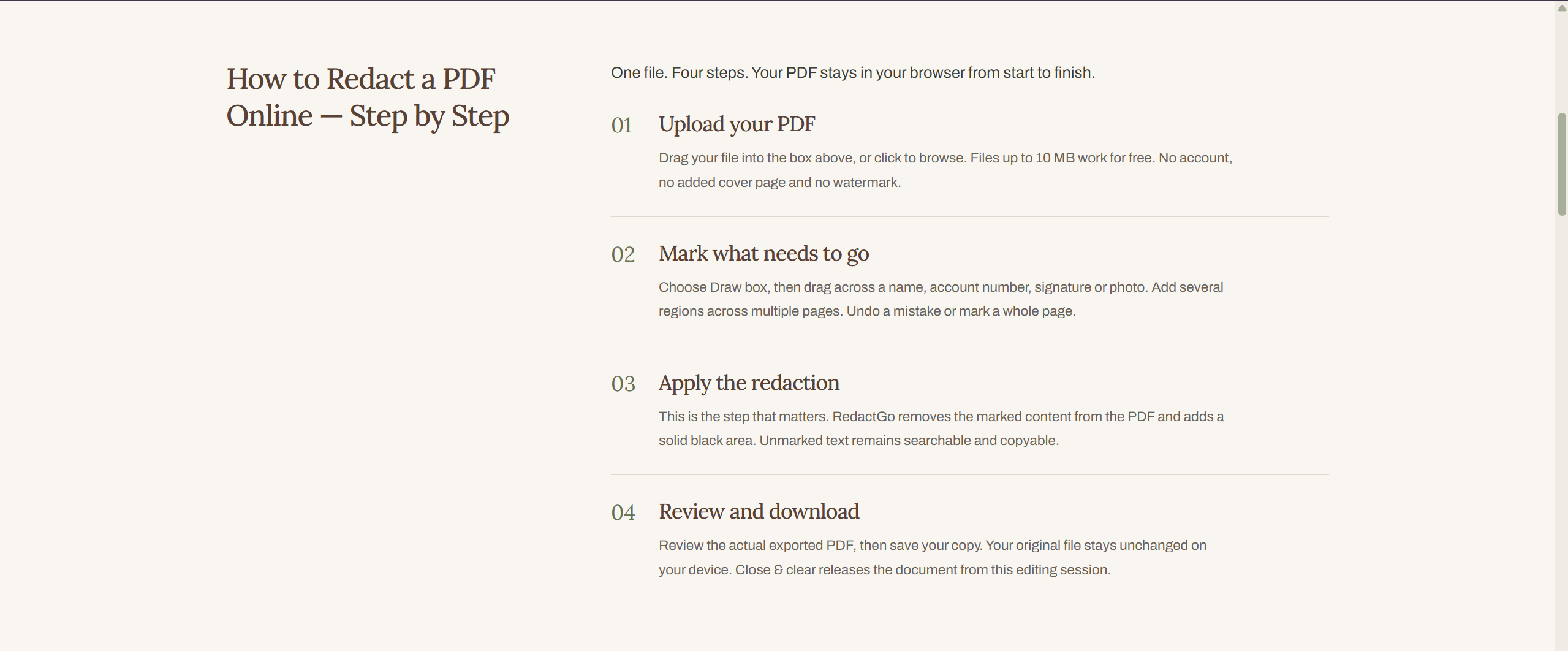
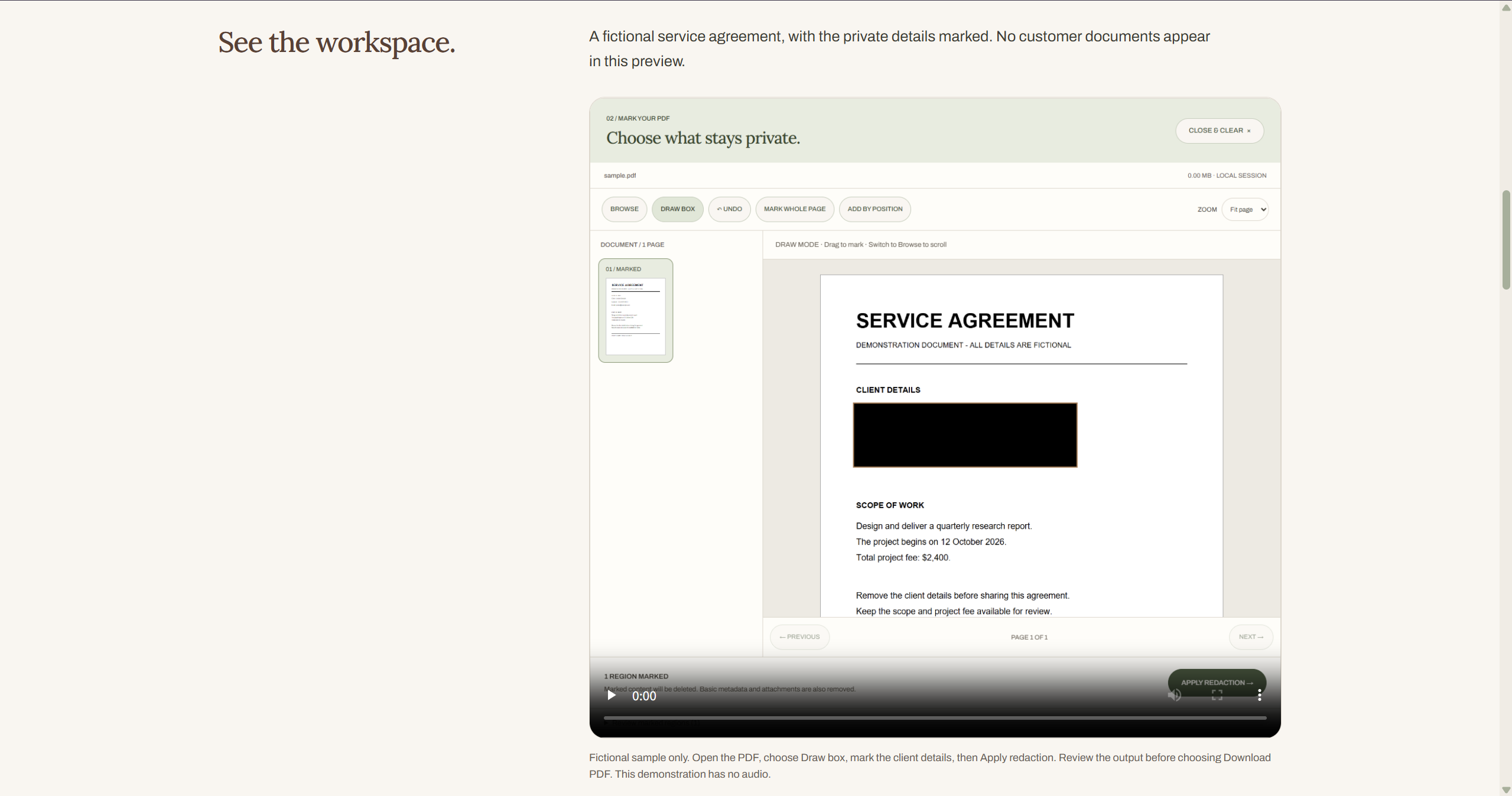
RedactGo is a free, browser-local PDF redaction tool. Mark text, images, signatures, or an entire page, then generate and inspect the actual output PDF before downloading. Unmarked text stays searchable where possible, while basic metadata and embedded-file entries are removed for supported documents. No document uploads, signup, daily limit, or watermark. Unsupported complex PDFs are rejected instead of producing a misleading success result.
Features
Redact text, images, signatures, or an entire page
Preview the actual output PDF before you download it
Unmarked text stays searchable where possible
Removes basic metadata and embedded-file entries from supported documents
Runs locally in your browser, so documents are never uploaded
Free, with no signup, no daily limit, and no watermark
Rejects complex PDFs it can't handle instead of showing a misleading success result
Use Cases
Hide personal details such as names, addresses, or ID numbers before sharing a PDF
Black out account numbers on bank statements, invoices, or tax forms
Remove signatures from contracts or forms before posting a copy
Prepare redacted documents for legal, HR, or compliance requests
Share screenshots or reports with clients without exposing internal data
Quickly redact a sensitive file when you don't want to upload it to an online tool
Comments



Hi Fazier 👋 I built RedactGo because most online redaction tools ask you to upload the exact documents you're trying to protect, which always felt backwards to me. RedactGo runs entirely in your browser. Mark text, images, signatures or a whole page, then check the real output PDF before you download it. It's free, with no signup, no daily limit and no watermark. One thing I cared about was honesty: if a PDF is too complex to redact safely, RedactGo rejects it instead of showing a fake "success". I'd love to hear which documents you'd use it on, and any PDFs that don't work for you.
This is exactly how a redaction tool should work — everything stays in the browser, so you never have to trust a server with the document you are trying to keep private. The preview of the actual output PDF before downloading is a great trust-builder, and I appreciate that it rejects complex PDFs it cannot handle instead of silently producing a bad result. One feature that would make it even better for legal and HR use: batch processing for multiple files at once. Clean, honest tool.

Rejecting PDFs you cannot safely handle is a reassuring choice, especially for contracts. A small post-redaction checklist (try searching/copying the hidden text, then check document properties) would help nontechnical users understand why a black box alone is not enough. Does the output preview also flag any remaining annotations?
Rejecting PDFs you can't handle, instead of showing a fake success, is the right call. How do you confirm the redacted text is gone from the content stream rather than covered by a black box? A step in the preview that searches the output for the marked strings would let users see that for themselves. Does it also handle text in form fields and annotations?

Showing the actual output PDF before download is the right call. The classic redaction failure is a black box drawn over text that is still selectable underneath. Does the preview also prove the text layer is gone, for example by running a search over the redacted areas? A small note like 0 hidden matches found would make it easy to trust before sending a file to a client.
Local processing is the right default for a redaction tool. Redact says the PDF stays in the browser, you can mark text, images, signatures or a whole page, and you can inspect the output PDF before downloading. That inspect step matters, because a box drawn over text is not the same as removing the text from the file.




Redaction tools that force you to upload sensitive files always felt like a massive security risk, so having everything process locally in the browser is exactly how it should be done. The preview feature is a great trust-builder, especially since the biggest pitfall with PDF redaction is just drawing a black box over a text layer that remains searchable. Love the transparency of rejecting overly complex files instead of failing silently. Congrats on the launch!

Running the whole redaction locally in the browser is the right trade-off for sensitive PDFs — uploading a contract or bank statement just to redact it always felt backwards. I especially like that you show the actual output PDF before download and reject files you can't safely handle instead of pretending it worked. One question: how large can a PDF be before browser performance becomes an issue?

Previewing the real output PDF before download is the part that makes this credible for sensitive files. Two things I'd be curious about: how does it handle scanned pages that have no text layer, can I mark an area by hand there? And do annotations or form fields inside the original PDF get removed from the output as well, or only the marked text?

Running PDF redaction entirely client-side in WebAssembly/browser memory is essential for sensitive documents like financial statements or medical forms where cloud upl oad is a compliance blocker. The transparency of rejecting PDFs that can't be safely sanitized rather than creating a false sense of security is very thoughtful engineering. Are there plans to support pattern matching (like automated regex for SSN or phone numbers) in a future update?

Rejecting PDFs it can't handle instead of reporting a success is the right call. The classic redaction failure is a black box drawn over text that is still in the file. Does the preview step also check for that, for example by extracting the text of the output and confirming the marked words are gone? Showing that check next to the preview would make it very easy to trust.

Doing redaction locally is the right call, uploading a contract to "redact" it always felt backwards. One question: do you remove the underlying text layer or only draw black boxes over it? A lot of tools leave the text selectable under the box, so a quick note or a "verified: text removed" check after export would build a lot of trust

Rejecting complex PDFs it can't handle, instead of returning a misleading success, is the right call. Most redaction tools fail silently. How do you handle scanned PDFs where the text only lives in the image layer? Is there OCR, or do those get flagged as unsupported? A lot of the supplier docs and drawings we see in manufacturing are scans.

Previewing the actual output PDF before downloading is the part that makes this trustworthy — too many redaction tools just black out pixels visually while the text stays underneath. I also like the decision to reject complex PDFs you can't handle safely instead of giving a false success. One question: for scanned PDFs where the text is just an image, does the preview show the redaction applied to the image layer as well?

Rejecting a complex PDF instead of producing a misleading success result is the right call for a redaction tool, since a silent failure there is worse than no output. Being able to inspect the actual output PDF before downloading closes the trust gap. How do you handle scanned documents where the text is only in the image layer?



I really like the privacy-first approach behind RedactGo. Processing PDFs directly in the browser without uploading sensitive documents is a valuable feature, especially for people handling contracts, invoices and personal records. Being able to preview the actual redacted PDF before downloading is also a great addition. I especially appreciate that the tool rejects complex PDFs it cannot safely process instead of giving users a false sense of security. Does RedactGo plan to support batch processing for multiple PDF files in the future? Great work!



Does the export fully rewrite the PDF, or can earlier incremental updates survive? A file that was edited and saved several times can still contain older versions of a page in previous revision sections, so a name may still be recoverable there even if the current page is clean. A short note in the preview like "file rewritten, no earlier revisions kept" would close that gap.

Previewing the actual output PDF before download is the part that makes this trustworthy — the classic redaction failure is text that looks blacked out but is still extractable underneath. Two questions: for scanned PDFs where the content is an image, does marking a region re-encode that page image so the pixels are truly gone? And when a PDF has incremental updates, does the export rewrite the file from scratch so earlier versions of the redacted text don't survive in the file history?
Premium Products

















































Awards
View all
Awards
View allMakers
Makers
Comments
Hi Fazier 👋 I built RedactGo because most online redaction tools ask you to upload the exact documents you're trying to protect, which always felt backwards to me. RedactGo runs entirely in your browser. Mark text, images, signatures or a whole page, then check the real output PDF before you download it. It's free, with no signup, no daily limit and no watermark. One thing I cared about was honesty: if a PDF is too complex to redact safely, RedactGo rejects it instead of showing a fake "success". I'd love to hear which documents you'd use it on, and any PDFs that don't work for you.
This is exactly how a redaction tool should work — everything stays in the browser, so you never have to trust a server with the document you are trying to keep private. The preview of the actual output PDF before downloading is a great trust-builder, and I appreciate that it rejects complex PDFs it cannot handle instead of silently producing a bad result. One feature that would make it even better for legal and HR use: batch processing for multiple files at once. Clean, honest tool.
Rejecting PDFs you cannot safely handle is a reassuring choice, especially for contracts. A small post-redaction checklist (try searching/copying the hidden text, then check document properties) would help nontechnical users understand why a black box alone is not enough. Does the output preview also flag any remaining annotations?
Rejecting PDFs you can't handle, instead of showing a fake success, is the right call. How do you confirm the redacted text is gone from the content stream rather than covered by a black box? A step in the preview that searches the output for the marked strings would let users see that for themselves. Does it also handle text in form fields and annotations?
Showing the actual output PDF before download is the right call. The classic redaction failure is a black box drawn over text that is still selectable underneath. Does the preview also prove the text layer is gone, for example by running a search over the redacted areas? A small note like 0 hidden matches found would make it easy to trust before sending a file to a client.
Local processing is the right default for a redaction tool. Redact says the PDF stays in the browser, you can mark text, images, signatures or a whole page, and you can inspect the output PDF before downloading. That inspect step matters, because a box drawn over text is not the same as removing the text from the file.
Redaction tools that force you to upload sensitive files always felt like a massive security risk, so having everything process locally in the browser is exactly how it should be done. The preview feature is a great trust-builder, especially since the biggest pitfall with PDF redaction is just drawing a black box over a text layer that remains searchable. Love the transparency of rejecting overly complex files instead of failing silently. Congrats on the launch!
Running the whole redaction locally in the browser is the right trade-off for sensitive PDFs — uploading a contract or bank statement just to redact it always felt backwards. I especially like that you show the actual output PDF before download and reject files you can't safely handle instead of pretending it worked. One question: how large can a PDF be before browser performance becomes an issue?
Previewing the real output PDF before download is the part that makes this credible for sensitive files. Two things I'd be curious about: how does it handle scanned pages that have no text layer, can I mark an area by hand there? And do annotations or form fields inside the original PDF get removed from the output as well, or only the marked text?
Running PDF redaction entirely client-side in WebAssembly/browser memory is essential for sensitive documents like financial statements or medical forms where cloud upl oad is a compliance blocker. The transparency of rejecting PDFs that can't be safely sanitized rather than creating a false sense of security is very thoughtful engineering. Are there plans to support pattern matching (like automated regex for SSN or phone numbers) in a future update?
Rejecting PDFs it can't handle instead of reporting a success is the right call. The classic redaction failure is a black box drawn over text that is still in the file. Does the preview step also check for that, for example by extracting the text of the output and confirming the marked words are gone? Showing that check next to the preview would make it very easy to trust.
Doing redaction locally is the right call, uploading a contract to "redact" it always felt backwards. One question: do you remove the underlying text layer or only draw black boxes over it? A lot of tools leave the text selectable under the box, so a quick note or a "verified: text removed" check after export would build a lot of trust
Rejecting complex PDFs it can't handle, instead of returning a misleading success, is the right call. Most redaction tools fail silently. How do you handle scanned PDFs where the text only lives in the image layer? Is there OCR, or do those get flagged as unsupported? A lot of the supplier docs and drawings we see in manufacturing are scans.
Previewing the actual output PDF before downloading is the part that makes this trustworthy — too many redaction tools just black out pixels visually while the text stays underneath. I also like the decision to reject complex PDFs you can't handle safely instead of giving a false success. One question: for scanned PDFs where the text is just an image, does the preview show the redaction applied to the image layer as well?
Rejecting a complex PDF instead of producing a misleading success result is the right call for a redaction tool, since a silent failure there is worse than no output. Being able to inspect the actual output PDF before downloading closes the trust gap. How do you handle scanned documents where the text is only in the image layer?
I really like the privacy-first approach behind RedactGo. Processing PDFs directly in the browser without uploading sensitive documents is a valuable feature, especially for people handling contracts, invoices and personal records. Being able to preview the actual redacted PDF before downloading is also a great addition. I especially appreciate that the tool rejects complex PDFs it cannot safely process instead of giving users a false sense of security. Does RedactGo plan to support batch processing for multiple PDF files in the future? Great work!
Does the export fully rewrite the PDF, or can earlier incremental updates survive? A file that was edited and saved several times can still contain older versions of a page in previous revision sections, so a name may still be recoverable there even if the current page is clean. A short note in the preview like "file rewritten, no earlier revisions kept" would close that gap.
Previewing the actual output PDF before download is the part that makes this trustworthy — the classic redaction failure is text that looks blacked out but is still extractable underneath. Two questions: for scanned PDFs where the content is an image, does marking a region re-encode that page image so the pixels are truly gone? And when a PDF has incremental updates, does the export rewrite the file from scratch so earlier versions of the redacted text don't survive in the file history?
Premium Products
New to Fazier?

Find your next favorite product or submit your own. Made by @FalakDigital.
Copyright ©2026. All Rights Reserved