
Pixal3D
Image to 3D model generator
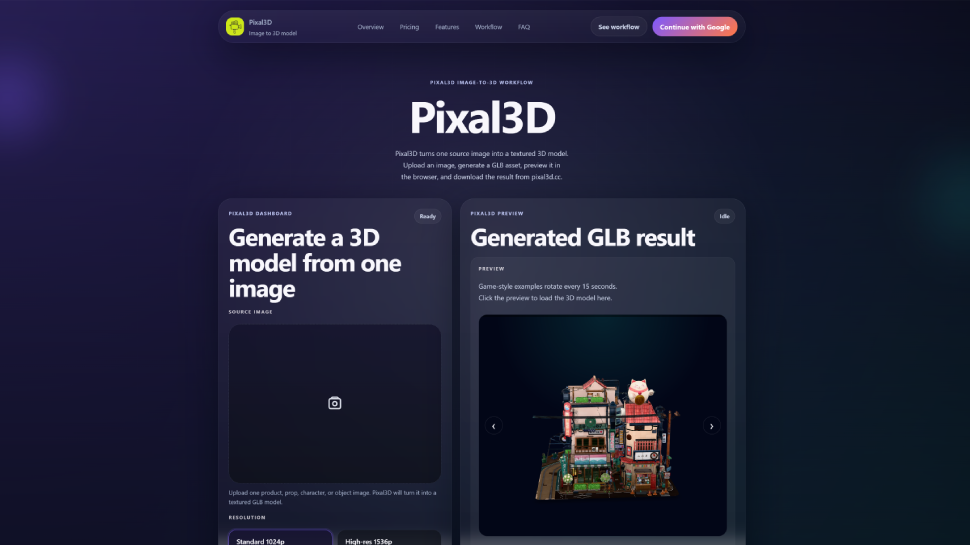
Do you need a 3D model from a simple picture? [Pixal3D](https://pixal3d.cc/) is a web tool that turns one image into a textured 3D model. You do not need to install any software. Everything works in your browser. This article explains what Pixal3D is and who will find it useful.
## What is Pixal3D?
Pixal3D is an **image-to-3D model generator**. You upload a single image — for example, a product photo, a character drawing, or a prop picture. The website then creates a textured GLB file. GLB is a common 3D format used in games, apps, and web previews.
After generation, you can **preview the model in your browser** right away. You can also download it to your computer. The tool saves your generation history, so you can come back and download old models again. Everything is managed with credits. Each generation uses a certain number of credits. You can buy credits or subscribe to get more.
## Who should use Pixal3D?
Pixal3D is made for people who need quick 3D models but do not have time to learn complex 3D software. Here are some examples:
- **Product teams** – Turn a product image into a 3D model for online previews or mockups.
- **Game designers** – Create draft GLB assets for props, collectibles, or character references.
- **Indie builders** – Make 3D models for your own projects without hiring a 3D artist.
- **Small business owners** – Show your products in 3D on your website for a better customer experience.
- **Fashion creators** – Generate 3D drafts from photos of shoes, bags, or accessories.
The tool is also good for beginners. You do not need any 3D modeling skills. Just upload an image and wait a few seconds for the result.
## Key features at a glance
- **One image input** – Upload a single photo. No need for multiple angles or videos.
- **Two resolution modes** – Choose 1024p for fast drafts or 1536p for more detail.
- **Browser preview** – See your model instantly before downloading.
- **R2 storage** – Generated models are saved online, so you can access them later.
- **Credit system** – Transparent pricing with no hidden fees.
- **Generation history** – Your past models are listed in the dashboard.
## When is Pixal3D not the best choice?
Pixal3D is not a replacement for professional 3D modeling software. The generated models may not be perfect for every use. They depend on AI and third-party systems. If you need a highly accurate, watertight model for manufacturing, you might still need manual work. But for quick drafts, previews, and concept exploration, it is a very helpful tool.
## How to start
Go to [Pixal3D](https://pixal3d.cc/) and click the generator. Upload your image, pick a resolution, and use your credits. In a few moments, you will have a 3D model ready to preview and download. It is that simple.
## Final words
Pixal3D is a practical, easy-to-use image-to-3D generator. If you are a creator, designer, or small business owner who needs 3D models fast, give it a try. No training required — just your image and a browser.

Comments

Premium Products

























Find your next favorite product or submit your own. Made by @FalakDigital.
Copyright ©2025. All Rights Reserved